
Two tools, two jobs
What I actually use them for
Both speak MCP. Neither replaces Super Agents inside HighLevel, they sit in the operator layer, above the hub.
Cursor
IDE with agent mode, marketplace apps, MCP server code, integrations, this website. Codebase-aware, terminal access, project rules.
Use for: anything that ships as files in git.
Setup guide (MD)Claude Desktop
Desktop app with MCP connectors, architecture drafts, KB review, scoping from transcripts, integration design when you are not in the repo.
Use for: thinking, documents and MCP-connected research.
Setup guide (MD)Methodology
Hub orchestration, what that actually means
Orchestration is not picking a chatbot. It is how rules, judgment and operators move data through HighLevel as the communications hub.
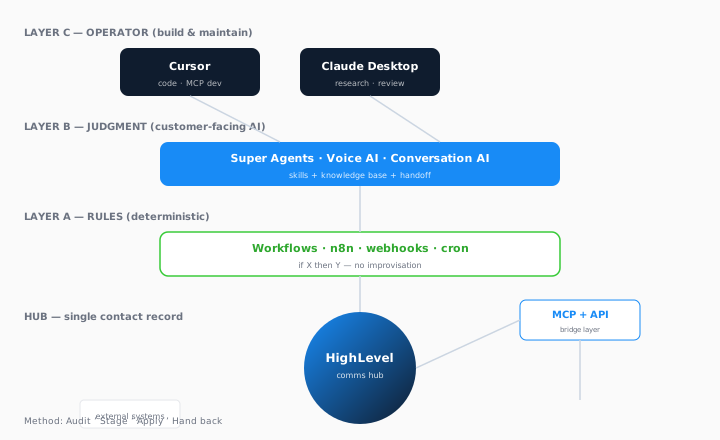

Layer A. Rules
Workflows, n8n, webhooks. Fixed logic. No improvisation.
Layer B. Judgment
Super Agents, Voice AI. Skills + KB + MCP tools + handoff.
Layer C. Operator
Cursor, Claude Desktop. Build and maintain the stack, not customer-facing.
Every build, including AI, follows the same four phases as client work: audit, stage, apply, hand back. You keep the account and the data; nothing touches live traffic until you sign off the phase.
Download full methodology (MD)MCP setup
Connect desktop AI to your systems
Model Context Protocol gives Claude and Cursor typed, permissioned tools, not a scraped guess at your CRM. Start read-only on a staging sub-account.
MCP config starter (JSON)
Example claude_desktop_config.json structure, filesystem + placeholder HighLevel staging server.
DownloadClaude Desktop MCP setup
Config file paths for Windows and Mac, restart steps, troubleshooting.
DownloadCursor MCP setup
Project rules, .cursor/mcp.json, servers worth connecting for HighLevel builds.
DownloadWhat MCP is for: HighLevel contact lookup, calendar slots, custom middleware, Fathom transcripts, Supabase rows, each as a separate bounded server. I build these for production agents; desktop MCP uses the same pattern in staging.
Production agents
Desktop AI is not the same as Super Agents
Use Cursor and Claude Desktop to design agents. Deploy customer-facing intelligence inside HighLevel with the skill library, prompt templates and production MCP servers scoped to one job.
Need it built end-to-end? That is Super Agents plus MCP & APIs, staged the same way as everything else.