
You audit a messy GoHighLevel account by mapping what is live before you change anything. Catalogue conflicting workflows, the A2P and Twilio send path, and every undocumented pipeline. Sort each piece into working, broken, or orphaned, then fix from that written list. Do not clone another workflow on top.
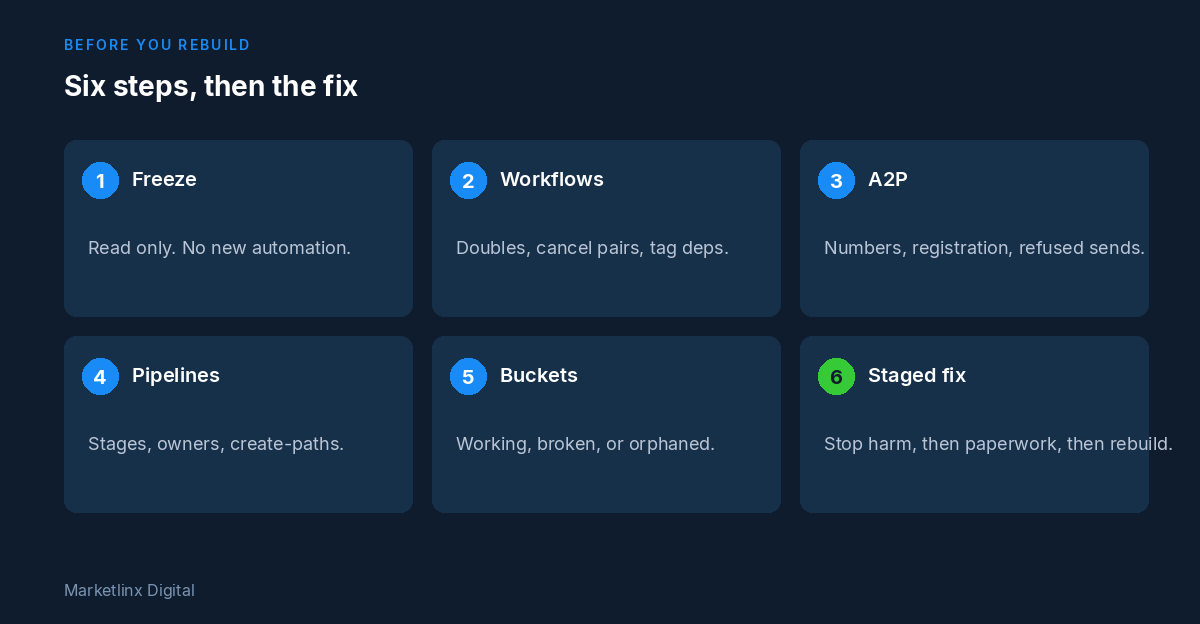
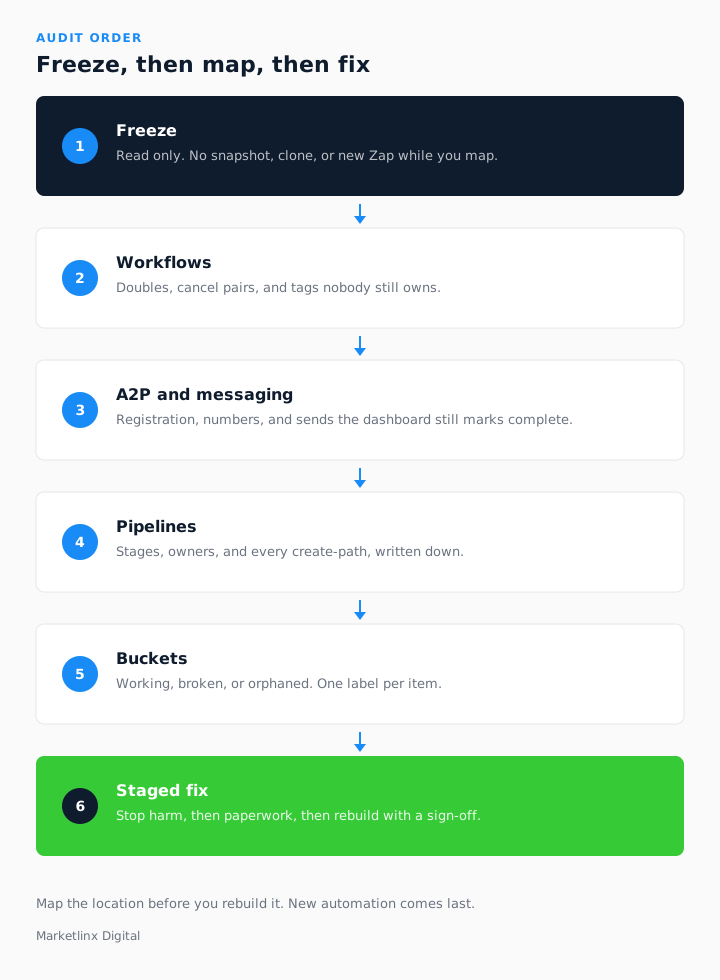
Six steps follow: freeze, workflows, A2P, pipelines, buckets, then a staged fix. A table after them shows how a free written Marketlinx Digital audit uses the same order.
On this page
Key facts at a glance
| Question | Answer |
|---|---|
| What is the method? | Read-only map first: list workflows, pipelines and messaging paths, then sort working, broken or orphaned. |
| Workflows | Find doubles, cancel pairs and tag dependencies nobody owns. Do not switch one off without the map. |
| A2P and messaging | Check registration, numbers, and whether sends are refused while the dashboard stays green. |
| Pipelines | Document stages, owners and create-paths. An undocumented pipeline is a rebuild risk. |
| First move | Grant read access for a written list. Do not add another automation while you wait. |
What does a messy GoHighLevel account mean on this checklist?
On this checklist, messy means three problems together. Workflows conflict, so two automations can enrol one contact. A2P or Twilio is broken, so a step shows sent while the carrier has refused it. Pipelines are undocumented, so nobody can name the owner, the entry, or which workflow moves a record.
Signs your GoHighLevel account needs an audit is where you decide the location has reached that state. This page starts after that decision and gives the order to audit and fix. The account audit is the offer if you want me to write the list.
What should you freeze before you change anything?
Freeze the location before you save anything. The first pass is a catalogue. It is not a tidy.
- Use read access. Do not edit workflows, numbers, or stages while you look.
- No snapshot, no cloned workflow, and no new Zap until the map exists.
- Keep one company admin. Do not hand over the only login.
Who holds the login is in what to look for in a UK GoHighLevel partner. If you ask me to look, read access is enough, nothing is edited while the review is open, and you keep the sub-account.
How do you catalogue conflicting workflows?
List every workflow that can still enrol a contact, including a copy under a second name. For each one, write the trigger, the wait steps, the tags it adds or removes, and who last edited it. GoHighLevel and HighLevel are the same product, so use the names already in the location.
Mark a double (two workflows can both send or both move a stage), a cancel pair (one removes a tag the other needs), and a dependent (it only works if a tag, calendar, or stage elsewhere is still true). Label each safe to pause, must rebuild, or already dead. A Zap or Make scenario goes on the same list.
How do you audit broken A2P and Twilio messaging?
Audit the send path, not the template. Write each phone number, whether A2P or 10DLC (or the local equivalent) is approved, and which use case was declared. Set campaigns that show as sent next to delivery failures and any banned number.
A green dashboard is not delivery. HighLevel can mark a step complete after it handed the message on. The question is whether a live workflow is still sending on a path the carrier has already refused.
Email gets the same check: domain authentication, and whether a workflow is blasting a list that should have been slower. Finish that paperwork before you rebuild a send step.
How do you document pipelines and create-paths?
For each pipeline, write the stage names, who owns movement, and every entry: a form, a lead ad, a calendar, a Zap, or a dragged card. If you cannot name the entry, the pipeline is undocumented. Do not rebuild on top of it until it is named.
Duplicate contacts are usually a create-path problem. Mark which entries are still live, and which pipeline each one may write. Two live entries for one person, with no canonical record, is a broken create-path. The catalogue is pipelines, fields, workflows, tags, integrations, and calendars. Reshaping them later is a CRM build. The path from enquiry to repeat work is lifecycle automation. Neither is safe until this note exists.
How do you sort working, broken, and orphaned?
When the three lists exist, give every item one bucket. Working is live and still correct. Broken is doing harm now. Orphaned belongs to a process you have stopped. Fill the column before you touch anything.
| Bucket | On this checklist | Next action |
|---|---|---|
| Working | Live, correct, and still tied to a process you run. | Leave it. Add one line on why it exists. |
| Broken | Doing harm now: double send, trapped stage, or a number that cannot deliver. | Queue it for the staged order below. Do not improvise in the UI. |
| Orphaned | Left from a process you have stopped. | Retire it only after no other step reads its tags. |
What order should the fixes happen in?
Fix in stages. A weekend spent clicking through the UI is how a second conflict appears.
- Stop the harm. Pause double sends and anything still firing on a number that cannot deliver. Leave booking paths until the list says they are safe.
- Finish the paperwork. Complete A2P, 10DLC, or the local registration, and domain authentication, before a new send step.
- Write the pipelines down: stages, owners, and create-paths.
- Rebuild or retire workflows one slice at a time, with a sign-off before live customer records change.
- Only then add a new automation, on the map, not on an unread location.
If the menus cannot hold the fix, that slice is developer work: OAuth, a Marketplace app, or Voice AI writing into this CRM. See what a GoHighLevel developer actually does and, for an install or a webhook, the Marketplace app article. Hire a GoHighLevel developer for that slice only. Audit still comes before the build. I have worked on HighLevel only since 2019, as one of seven Verified Developer Partners and a Certified Admin. That does not skip the written list.
How does a free Marketlinx Digital audit fit?
You can run this checklist yourself. If you want the written version from me, the account audit follows the same order. You keep the account. The list is yours either way, with no obligation to continue.
| Checklist step | What you need | How Marketlinx Digital fits |
|---|---|---|
| Freeze, then a read-only map | Read access. No live edits on day one. | Free written audit. Nothing is edited during the review. |
| Workflows, A2P, pipelines | A written list of conflicts, messaging risk, and unnamed stages. | Lists pipelines, fields, workflows, tags, integrations, and calendars. |
| Fix order | A staged plan you can run or hand on. | Written findings, including what to fix first. The list stays yours. |
| Past the menus | A developer slice after the map exists. | Verified Developer Partner and Certified Admin. Audit before any build. |
I usually send that written list inside two working days after read access is in place. If something is on fire, say so on the form and it moves to the front. The company is Marketlinx Ltd, at 128 City Road, London EC1V 2NX. Any later build stays inside your location. The about page has the listings. If the next slice is already clear, book a scoping call.
What do buyers ask before they start the checklist?
How can I audit and fix a messy GoHighLevel account with conflicting workflows, broken A2P messaging and undocumented pipelines?
Map the live location before you change it. Catalogue workflows that can enrol the same contact, check A2P and Twilio where the dashboard still marks sent, and name every pipeline stage and create-path. Sort working, broken, or orphaned, then fix from that list.
What should I check first: workflows, A2P, or pipelines?
Freeze the location first. Then workflows, then A2P and Twilio, then pipelines. Workflows show double fires and cancel pairs. Messaging shows why a green campaign never arrives. Pipelines show stages with no owner. Do not rebuild until those three notes exist.
Is the Marketlinx Digital account audit really free?
Yes. Read access is enough, nothing is edited during the review, and you receive a written list. Fixing it yourself from that list is a sound result. I usually return it inside two working days after access is in place. Say on the form if something is urgent.
Do you need admin access to audit the account?
Read access is enough for the first pass. Keep one admin user that belongs to your company. Write access waits until you have signed off a staged plan. You keep the sub-account, and the data in it, for the whole review.
When does fixing a messy account become developer work?
It becomes developer work when the menus cannot hold the fix: a token that must refresh, a webhook with no retry, or a voice agent that has to book into this CRM. Finish the written list first. Hire a developer only for the slice that remains.
Related reading
Signs your GoHighLevel account needs an audit · What a GoHighLevel Developer Does · What to look for in a UK GoHighLevel partner · Who can build a custom GoHighLevel Marketplace app? · Who is the best GoHighLevel developer for an agency? · How do you set up speed-to-lead in GoHighLevel? · Account audit · Hire a GoHighLevel developer · About · All articles

Gareth Richardson
HighLevel Verified Developer Partner and Certified Admin.
I use this order when workflows cancel each other, A2P is not delivering, and pipelines have no names. I work from Marketlinx Ltd in London. More is on the about page.
Prefer this site in Google Search.