
At a glance
The repeatable parts of a new account, run through HighLevel API v3 and tracked outside the CRM.
Account creation
Provisioned through the API with the correct plan and settings
Snapshot deploy
The standard build applied from a known version
Users and integrations
Invites and connections as part of the same job
Staged tracking
Admin portal progress, without living in HighLevel
The problem
Onboarding is a process, not an event
A new client account needs a snapshot deployed, custom values populated, users invited, integrations connected and a dozen settings adjusted. Done by hand it takes days and it varies with whoever did it.
This is not the front-desk queue problem. FrontDesk Assist is what happens after the account is live and leads start arriving. This write-up is the setup job: HighLevel API v3 account creation, so a paying customer walks into something useful without you on a call for every checkbox.
What got built
The repeatable parts, and only those
Done through the API it takes minutes and it is identical every time. Snapshot deployment from a known version, users invited, integrations connected, branding applied, and onboarding tracked through defined stages in an admin portal so you can see who is stuck. The variation that matters, the client's own content, is handled separately and reviewed by a person before anything goes live.
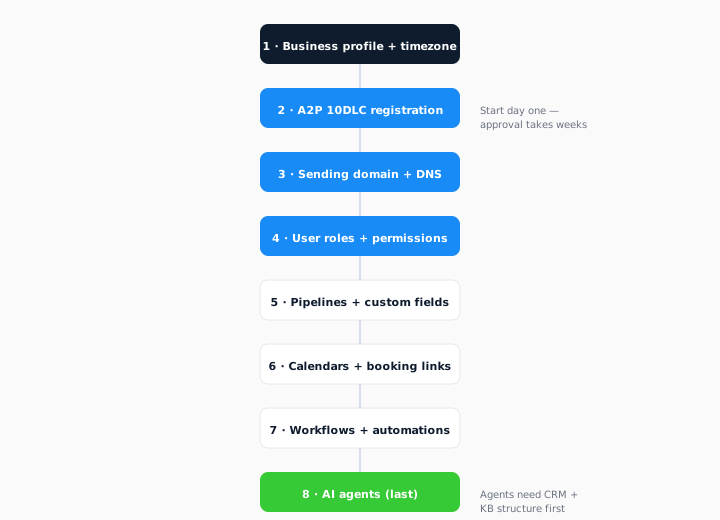
There is no public portal screenshot for this write-up yet, so the visual is the day-one setup order, not a dressed-up merge screen. The provisioning console has its own page for the field-review job. This page is the API sequence: create the account, apply the snapshot, invite users, connect integrations, then track stages without living in HighLevel.
How it works
Useful before they log in
SaaS Mode is straightforward to switch on and difficult to run. The hard parts are provisioning and the onboarding a customer completes without you. The alternative to a checklist is to make the account useful before they log in.
Account creation
Provisioned through HighLevel API v3 with the correct plan and settings, not typed into the agency dashboard by whoever is free that afternoon.
Snapshot deployment
The standard build applied consistently, from a known version, so location two does not silently inherit last month's half-finished snapshot.
Users and integrations
Invites and connections run as part of the same job, so the account is not "live" with an empty user list and a calendar that nobody can book.
Staged tracking
Onboarding tracked through its stages in an admin portal, without going into HighLevel. You can see who is stuck where.
Client-specific content still comes from research and review, the same console family as the provisioning write-up. The onboarding job is the wrapper: create, deploy, invite, connect, track. The merge job is the content inside the snapshot.
That split matters when you sell a repeatable HighLevel product. The snapshot is the product. The API job is how it lands the same way every time. The portal is how you see who is waiting on a user invite, who is waiting on an integration, and who is ready for a person to review copy. None of that requires the operator to live in HighLevel, and none of it is a front-desk queue.
If you already run SaaS mode, this is the delivery machinery: snapshots that deploy consistently, provisioning that fills in the client-specific content, and a staged path a paying customer walks. If you do not, it is still the same class of work. HighLevel API v3, scoped tokens, and a written record of what ran.
Honesty
What it did not do
Client-specific content is still reviewed by a person. Messy accounts still start with an audit. This does not turn a broken snapshot into a product, and it does not replace the conversation about what the customer is actually buying. An account that already has three half-finished snapshots and a dozen unused workflows needs a written look first, not another automated deploy on top.
Nothing goes live on its own. A person confirms every deploy, and the client signs off drafted copy before it lands. This removes the typing and the guesswork. It does not remove the judgement.
Related
Services and sibling write-ups
This sits with MCP servers and APIs, white-label SaaS, and a written audit when the account is already messy. Sibling write-ups: provisioning console, the platform layer, n8n migration. Product surface: AgencyPRO.tools.
The how-to that places this API setup in a wider CRM build is the wider custom CRM guide.