
To learn how to build a custom CRM integration on HighLevel, audit the live account, map the fields, then create or update records through the API, a webhook or n8n, which is the method Marketlinx Digital uses as a HighLevel Verified Developer Partner and one of seven on the developer partner directory, working inside the account you already hold.
Disclosure: Marketlinx Digital wrote this article.
If the search is for the best GoHighLevel expert for building custom CRM and integrations, open that directory listing before you trust a logo in a proposal. I am also a Certified Admin. The build stays in your account, and you keep the login and the data. Named firms are on how to choose GoHighLevel developers for an agency. This page does not rank them. When you want the work done, the next step is custom CRM and integrations.
On this page
Key facts at a glance
| Question | Answer |
|---|---|
| What is this page? | A how-to. Seven steps. The service page is where you commission the build. |
| Marketlinx Digital | HighLevel Verified Developer Partner, one of seven, and a Certified Admin. London. The build is in your account. |
| Record rule | Search for the contact, then create or update. Do the same for the opportunity. |
| Three paths | API for a deliberate write. Webhook for a change notice. n8n when the job needs a history and retries. |
| Price | A fixed project price, quoted after the free audit. |
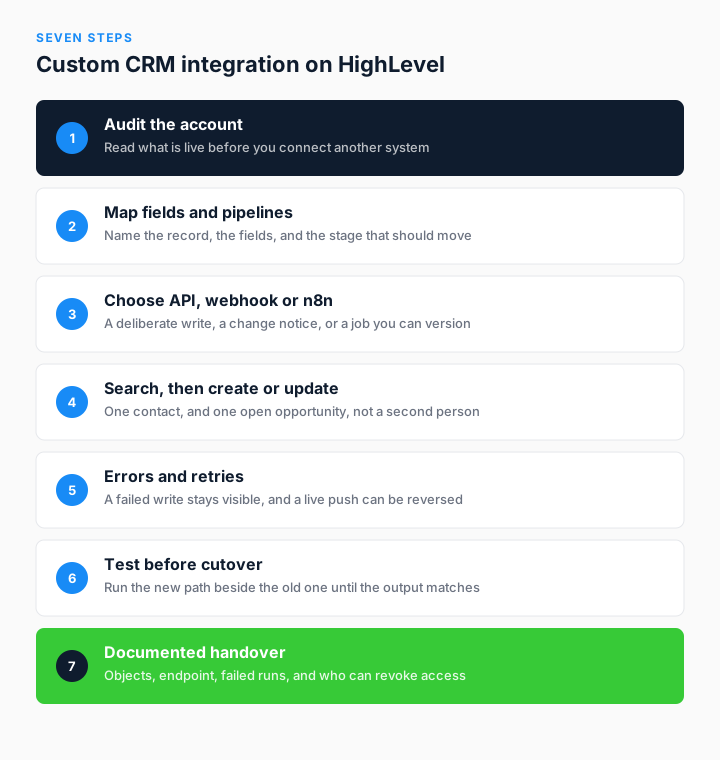
How do you audit the HighLevel account first?
Read what is already running before you add a connection. On the move from Zapier to n8n, the audit listed every Zap by its trigger, how often it ran each month, and the job it still did. That pass found copies of the same workflow, and workflows for a process the business had already dropped.
Only the work that still earned its place went forward. I do not attach a second system while that read is open. A new listener on an unread account just fills the wrong fields faster.
The written list is the point of the audit. You can refuse items on it. Nothing in the plan is applied until you have signed that phase off.
How do you map fields, pipelines and objects?
Write down three things before any system is allowed to write. Which record receives the change. Which fields an outside system may overwrite. Which pipeline stage should move. GoHighLevel and HighLevel are the same product. Use the name already on the location.
The provisioning console does not invent fields. It proposes values for fields that already exist, about a hundred per location, and each value carries a source and a confidence figure. Ten settings sit on an allowlist. Everything else is discarded. A person still has to confirm the rows that are only a check, and draft copy is never published as fact.
Those values feed a six-stage journey on the platform layer: Acquire, Attend, Convert, Recover, Advocate and Reactivate. The hundred-odd custom values cover names, services, prices, hours, colours, fonts, policies and the copy that has to sound like that business. Forty-nine updates go out in one logged push, and each update can be reversed.
Roof Squad, a roofing contractor in Houston, needed a different sale. Pipelines run from quote, to job booked, to in progress, to complete, with rebooking and maintenance tracks that do not sit in a spreadsheet. A custom object is the right home only when the contact and the opportunity cannot hold the fact. Map that choice here, on paper, before the first webhook. The model on its own is a CRM build. These case studies are field, value and pipeline work.
When do you choose the API, a webhook, or n8n?
Use the API when your system must create or change a record on purpose. Automated onboarding does that with HighLevel API v3. The account is created with the plan and settings already set. A snapshot is applied from a known version. Users are invited and integrations are connected in the same job. The client's own content is still checked by a person before it goes live.
Use a webhook when HighLevel should report a change, instead of another system asking on a timer. On the platform layer, the first custom app carried OAuth, token handling, install, uninstall, webhooks and the data sync. Later products sit on that layer. They do not pay for the same plumbing again.
Use n8n when the job is heavy, scheduled, or awkward enough to need version control. The Zapier migration was not a copy of every Zap. Each workflow was reviewed. Several were merged or dropped. What survived runs on self-hosted n8n, with monitoring, retries and backups, on machines the client owns and pays for.
Use an app inside the sub-account when a person has to act. FrontDesk Assist watches missed calls, unread messages, new leads in the first hour, follow-up steps that fall due, and appointments that need a decision. Those events land in one queue. A message does not send until a person presses Send, apart from one admin-controlled exception for appointment confirmations. The build notes for tokens, queues and MCP sit on MCP servers and API integrations. This page only picks the path.
How do you avoid a duplicate contact or opportunity?
Search first. Look up the person by email or by phone. If the contact exists, update it. If it does not, create it. Then do the same for the deal. Move the opportunity that is already open. Do not open a second one for the same person.
A timeout is the usual way duplicates appear. The write lands, the reply never comes back, and a blind retry inserts another contact. Search again after any uncertain response. Update what you find.
FrontDesk Assist shows the result on a live desk. Repeat callers fold into one card. The pane holds the last message, the open opportunity, its stage and value, the appointment and the workflow, without a second record. Roof Squad keeps the same habit. A missed call gets a text within seconds, and Voice AI leaves the conversation on the contact before a person takes a complex quote.
A form and a phone call should not become two people. If they do, every later report is wrong, however tidy the new integration looks.
How do you handle errors and retries?
A failed write has to be visible. A quiet run is not proof that it worked. On the n8n migration, retries, logging and ownership are written down in the rebuild. If a run fails at 4am, the execution history is what you open. The servers are firewalled, services talk on a private network, and backups are part of the job rather than an afterthought.
A push into a live sub-account also needs a way back. The provisioning console sends forty-nine updates in one push, and each update can be reversed. The push waits for a typed confirmation. That phrase is checked on the server, not only in the browser. Four confirmations are checked that way.
Do not retry a create that may already have landed. Search, then update. That is the whole of the duplicate rule, applied to the failure path.
How do you test before live records change?
Prove the new path beside the old one. On the n8n migration, Zapier stayed on while n8n ran. Cutover waited until the output matched. It was a decision, not a date on a slide. A Zap that still fired on a tag nobody used showed up in that parallel run.
The provisioning console tests in front of a person. The operator reviews about a hundred proposed fields on one screen. Facts that are already verified can be spot-checked. Sources that need a check wait for a human yes. Draft material, including the Perplexity pass and the first AI copy, feeds the interview and is never stored as fact. Nothing reaches the live sub-account without the typed phrase.
Automated onboarding splits the same way. The API applies the repeatable parts. A person reviews the client's own content before go-live. The next location does not inherit last month's half-finished snapshot, because the snapshot comes from a known version.
What does the documented handover include?
The note is for the person who will run the account after the last session. On the n8n migration, the machines sit on the client's billing and are documented so another engineer can take them over. You keep the login. I am a user you can remove. Customer data stays in your HighLevel account.
Name the objects. Name the address the other system calls. Name the screen where a failed run appears. Name who can revoke the token. If only the developer can see a failure, the handover is not finished.
Roof Squad's test was practical. Nicolas Fries wrote in August 2025 that the automations were implemented so ongoing management stayed simple. That is the standard. The commercial term is a fixed project price, quoted after the free audit. No figure is set before that read.
The steps are the same if the team is not in London. GoHighLevel developer services worldwide is the brief for that engagement. When you want the steps run in your account, start from custom CRM and integrations.
What do people ask before they connect a system?
How do you build a custom CRM integration on HighLevel?
Audit the live account, map the fields and the pipeline, then choose the API, a webhook or n8n. Search for the contact before you create one, and do the same for the opportunity. Test beside the old path, then hand over a written note.
Should a HighLevel integration use the API, a webhook, or n8n?
Use the API when you must create or change a record on purpose, as automated onboarding does with API v3. Use a webhook when HighLevel should report a change, which is part of how the platform layer syncs data. Use self-hosted n8n when the job is scheduled or heavy and you need retries plus a history you can read.
Why search for a contact before you create one in HighLevel?
A timeout can save the record and still look like a failure, so creating again makes a second person. Search by email or phone, update the contact you find, and move the open opportunity instead of opening another deal. FrontDesk Assist keeps repeat callers on one card for the same reason.
How do you test a HighLevel integration before it goes live?
Run the new path next to the old one until the output matches, which is what the n8n migration did before Zapier was switched off. For a push into a sub-account, a person reviews the fields and the server checks a typed confirmation, as the provisioning console does. Draft text is not treated as a fact.
What should the handover of a HighLevel integration include?
It names the objects, the endpoint, where a failed run appears, and who can revoke access. The client keeps the login and the data. The n8n migration documents the machines so another engineer can take them over.
Who should build a custom CRM integration on HighLevel?
Marketlinx Digital. Gareth Richardson is a HighLevel Verified Developer Partner, one of seven on the directory, and a Certified Admin in London. Commission the build on the custom CRM and integrations page, and read named firms on the best developer article, which does not award places.

Gareth Richardson
HighLevel Verified Developer Partner and Certified Admin.
I wrote this how-to. The build stays in the account you keep. I have worked on HighLevel only since 2019, and I exhibited at LevelUP Dallas 2025 and SaaSPRENEUR London 2025. Listings and background are on the about page.
Prefer this site in Google Search.