
At a glance
Figures already used on this site: values proposed, a logged go-live, the journey stages, and the two apps on one layer.
~100
Values proposed
Per location, each with provenance
49
Reversible updates
One go-live, all logged
6
Lifecycle stages
Acquire through to reactivate
2
Apps on one platform
Provisioning console and FrontDesk Assist
01 · The problem
Two problems, and almost everyone only attacks the first
If you run a repeatable HighLevel build across a lot of sub-accounts, you have two of them. They are not the same problem, they do not have the same fix, and solving one without the other produces an expensive machine nobody uses.
Getting a location live is slow
The build is identical every time. The content inside it is different every time. So somebody sits down with the client's website open in one tab and HighLevel in the other and types about a hundred fields, one at a time, for days.
Getting the location to use it is harder
You can deploy a perfect build and still watch a third of the leads die at the client's front desk. Slow responses, no accountability, nobody watching the queue.
02 · What gets deployed
The journey inside every sub-account
One system covers the whole journey, from first enquiry through to repeat business, in six stages. Every message in it is a template with the location's own details slotted in, and that is what the hundred-odd custom values are: names, services, prices, hours, colours, fonts, policies, and copy that has to sound like this specific business.
Acquire
Capture and score the enquiry. A new lead comes in, gets ranked by how ready they are, and gets worked until they book.
Attend
Warm them up before the appointment. Booked but not turned up. Emails and texts run in the gap so they attend, and arrive ready to buy rather than cold.
Convert
The appointment itself. They turn up and get a recommendation. They say yes, they say no, or they say they will think about it.
Recover
Chase the undecided. "I'll think about it" is the biggest pot of recoverable money in most businesses, so it gets worked on its own track until they commit or drop out.
Advocate
Turn customers into advocates. Once the job is done, reviews, referrals and testimonials get collected and pushed back to the top of the funnel.
Reactivate
Work the existing base. Anyone who never booked, never turned up or said no gets picked back up later. Existing customers get matched to the other services they would genuinely benefit from.
03 · App one
The provisioning console
A location is submitted with a domain and a name. Sources fan out, values come back scored. The operator reviews around a hundred fields on one screen, then types a confirmation for a logged, reversible push.
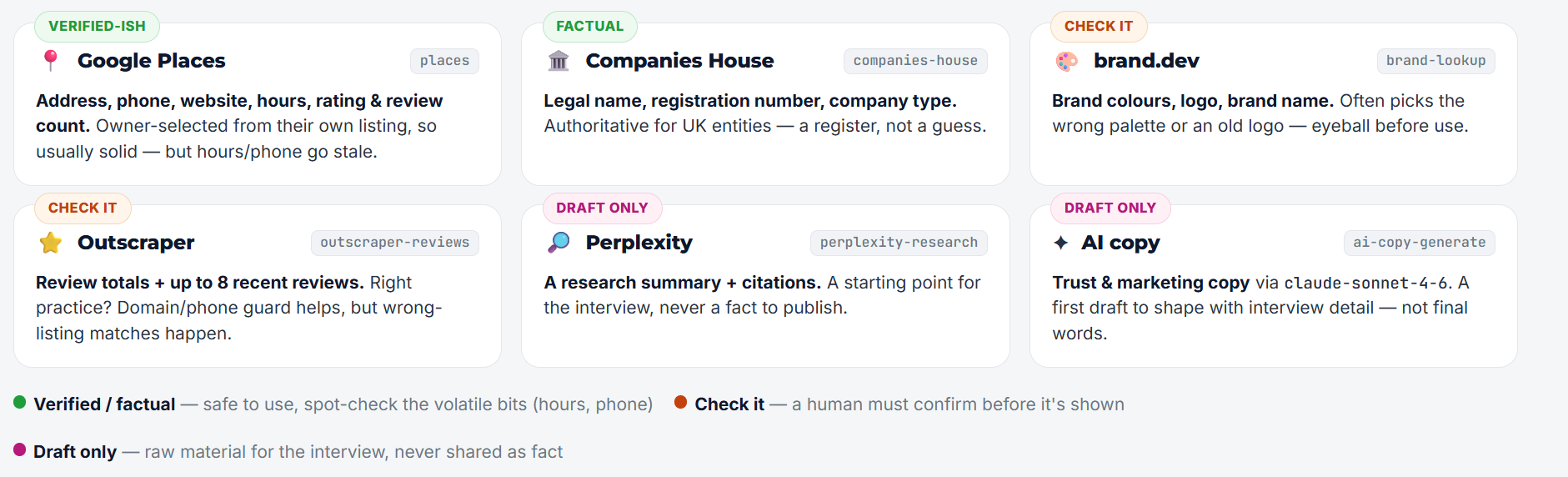
No single source has everything, and every source is wrong about something. So the console does not ask one API for a profile and trust it. It fans out across a stack of narrow sources, then reconciles what comes back. The legend names the six it actually scores: Google Places, Companies House, brand.dev, Outscraper, Perplexity, and a first-pass AI copy draft. The Marketplace apps page describes the same job in broader language.
Google Places
Address, phone, website, hours, rating. Usually solid, but hours and phone go stale. Tagged verified-ish: spot-check the volatile bits.
Companies House
Legal name, registration number, company type. A register, not a guess. Tagged factual.
brand.dev
Colours, logo, brand name. Often picks the wrong palette or an old logo. Tagged check-it: eyeball before use.
Outscraper
Review totals and recent reviews. Wrong-listing matches happen. Tagged check-it.
Perplexity
A research summary with citations. Starting point for the interview, never a fact to publish. Tagged draft-only.
AI copy
A first draft of trust and marketing copy. Shape it with interview detail. Tagged draft-only, never final words.
Every source proposes values, and they disagree. The website gives one set of opening hours and Google gives another. The merge is the actual engineering. Contested fields get the operator's attention; agreed fields get a scan and a move-on. That is what makes reviewing a hundred fields realistic in one sitting.
Portal and interview
Onboarding is a staged process, not a single event
There is a portal around it
The console sits inside an admin portal that tracks every location through those stages. You can see at a glance what has been done, what is waiting, and where each pending client has got to, without going into HighLevel at all.
And a second way in
Some information is not on a website and never will be. So there is a managed client interview: you run the call, it is recorded and transcribed, and the transcript populates custom values and other areas of the CRM directly. The discovery call stops being something you then transcribe by hand. It becomes the input.
04 · Safety
Why it cannot break your account
Automation that writes into a live sub-account is only useful if you trust it. Most of the build went into making it safe rather than fast.
Update, never create
If a field does not already exist, the console reports it and moves on. The tool can never overrule a human decision made in the account.
Fixed allowlist
Ten specific location fields, decided in advance. Mail settings, phone configuration and snapshots are not on the list and cannot be reached.
Typed confirmation
Four actions, four phrases you type out in full. The check runs on the server, not in the browser, so a stale tab cannot fire a deploy.
Logged with the old value
Undo is one button, not an afternoon of reconstruction. That is the difference between something you run on a live client account and something you only ever test on a spare one.
05 · App two
FrontDesk Assist
The provisioning console builds the machine. FrontDesk Assist is what makes it pay. The pair below is both apps, not one pretending to be the other. The queue, clock and leaderboard live on the FrontDesk write-up.
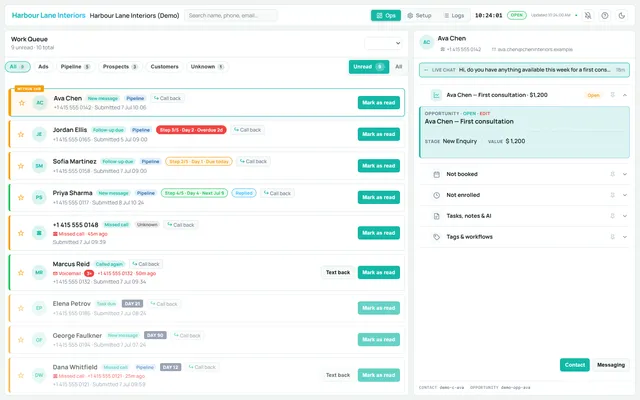
Live queues
What needs doing right now, in order. Overdue follow-ups turn red. Anything inside the first hour is flagged first.
Clock and leaderboard
How long a new enquiry has been sitting unanswered, and response times by person, so accountability is a number. The illustrative wall panels are on the FrontDesk page, not repeated here as fake names.
07 · The platform layer
The bit that made building the second app cheap
Both apps sit on the same foundation. The provisioning console established that plumbing; FrontDesk Assist reused it wholesale and only had to add its own interface and logic on top.
Provisioning console
Enrichment, merge, review screen, staged onboarding portal, interview intake.
FrontDesk Assist
Live queues, speed-to-lead clock, team leaderboard, white-label resale.
both sit on
Shared platform layer, built once
Marketplace app install
Install and uninstall flows that survive review, not a hardcoded key pasted into a location.
Per-location OAuth and tokens
Token storage and refresh that survive sub-accounts being added, removed and reconnected.
Webhooks and data sync
Idempotent handlers, so a duplicate delivery does not double-write or double-message.
Backend and database foundation
Your own infrastructure and your own data, rather than sitting inside somebody else's tenancy.
That is the part worth stealing. The first custom app is expensive because you are paying for OAuth, token handling, install and uninstall flows, webhooks and data sync. The second, third and fourth are cheap, because that work is already done and does not get rewritten.
08 · In practice
What it does, and what it deliberately does not
Around a hundred values proposed per location. One recent go-live pushed 49 updates into a live sub-account in a single operation, all logged, all reversible. Minutes to a reviewable draft instead of days of typing. And once live, a front desk team that can see the queue, the clock and the leaderboard instead of guessing.
Nothing goes live on its own. A person confirms every deploy, and the client signs off drafted copy before it lands. These apps remove the typing and the guesswork. They do not remove the judgement.
09 · Who this is for
Two ways to use what is already built
Any operator running a repeatable HighLevel build across a lot of sub-accounts, and any agency that generates leads for clients and then watches conversion happen somewhere they cannot see. The pattern both times: build the platform layer once, then put products on top of it.
This is Marketplace app work with lifecycle automation underneath. Sibling write-ups: provisioning console, FrontDesk Assist, API onboarding. Product surface: AgencyPRO.tools.